
Getting Started with Sophie
Last updated: February 13, 2026
Adding Sophie to Your Group
-
Open the "Administrator" settings of your group.
-
Select "Add admin" / "Add administrator."
-
Search for@rSophieBotand add Sophie as an admin to your group.
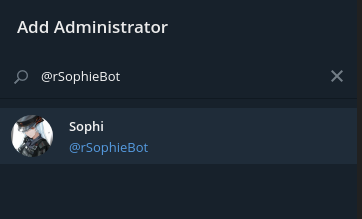
-
Start Sophie by sending/startinto your chat!
You can also open the following link to add Sophie to your group automatically
Add Sophie to your group
Setting Up Sophie for Your Group:
Explore this wiki for more details on features and commands.
Explore this wiki for more details on features and commands.
Key Features of Sophie
Sophie comes with several useful features right out of the box:
- Ban and Mute: Reply with /banor/muteto take respective actions. → Restrictions
- Warnings: Use /warnto warn users, and define actions after a member receives warnings. → Warnings
- Reports: Members can report messages with /report. → Reports
Configuration and Advanced Features
Sophie offers advanced configuration options:
- Set up antiflood to tackle spammers.
- Define forbidden words using Sophie's filter and actions for users sending those words.
- Join or create a federation of groups to ban individuals across participating groups.
There are also many features you can configure!
Ready to get started? Enjoy exploring Sophie's capabilities! 😉